Guardrails - 快速入门
在 LiteLLM Proxy (AI Gateway) 上设置 Prompt 注入检测、PII 屏蔽
1. 在 LiteLLM config.yaml 中定义 guardrails
在 guardrails 部分下设置您的 guardrails
model_list:
  - model_name: gpt-3.5-turbo
    litellm_params:
      model: openai/gpt-3.5-turbo
      api_key: os.environ/OPENAI_API_KEY

guardrails:
  - guardrail_name: general-guard
    litellm_params:
      guardrail: aim
      mode: [pre_call, post_call]
      api_key: os.environ/AIM_API_KEY
      api_base: os.environ/AIM_API_BASE
      default_on: true # Optional

  - guardrail_name: "aporia-pre-guard"
    litellm_params:
      guardrail: aporia  # supported values: "aporia", "lakera"
      mode: "during_call"
      api_key: os.environ/APORIA_API_KEY_1
      api_base: os.environ/APORIA_API_BASE_1
  - guardrail_name: "aporia-post-guard"
    litellm_params:
      guardrail: aporia  # supported values: "aporia", "lakera"
      mode: "post_call"
      api_key: os.environ/APORIA_API_KEY_2
      api_base: os.environ/APORIA_API_BASE_2
    guardrail_info: # Optional field, info is returned on GET /guardrails/list
      # you can enter any fields under info for consumers of your guardrail
      params:
        - name: "toxicity_score"
          type: "float"
          description: "Score between 0-1 indicating content toxicity level"
        - name: "pii_detection"
          type: "boolean"
支持的 mode 值 (事件钩子)
pre_call在 LLM 调用之前运行,作用于输入post_call在 LLM 调用之后运行,作用于输入与输出during_call在 LLM 调用期间运行,作用于输入 与pre_call相同,但与 LLM 调用并行运行。响应将在 guardrail 检查完成后返回- 以上值的列表,用于运行多种模式,例如
mode: [pre_call, post_call]
2. 启动 LiteLLM Gateway
litellm --config config.yaml --detailed_debug
3. 测试请求
- 调用失败
- 调用成功
预计会失败,因为请求中的 ishaan@berri.ai 是 PII
curl -i https://:4000/v1/chat/completions \
  -H "Content-Type: application/json" \
  -H "Authorization: Bearer sk-npnwjPQciVRok5yNZgKmFQ" \
  -d '{
    "model": "gpt-3.5-turbo",
    "messages": [
      {"role": "user", "content": "hi my email is ishaan@berri.ai"}
    ],
    "guardrails": ["aporia-pre-guard", "aporia-post-guard"]
  }'
失败时的预期响应
{
  "error": {
    "message": {
      "error": "Violated guardrail policy",
      "aporia_ai_response": {
        "action": "block",
        "revised_prompt": null,
        "revised_response": "Aporia detected and blocked PII",
        "explain_log": null
      }
    },
    "type": "None",
    "param": "None",
    "code": "400"
  }
}
curl -i https://:4000/v1/chat/completions \
  -H "Content-Type: application/json" \
  -H "Authorization: Bearer sk-npnwjPQciVRok5yNZgKmFQ" \
  -d '{
    "model": "gpt-3.5-turbo",
    "messages": [
      {"role": "user", "content": "hi what is the weather"}
    ],
    "guardrails": ["aporia-pre-guard", "aporia-post-guard"]
  }'
Guardrails 默认开启
在您的 guardrail 配置中设置 default_on: true,以便在每次请求时运行该 guardrail。如果您希望在每次请求时运行某个 guardrail 而无需用户指定,这将非常有用。
注意:即使用户指定了不同的 guardrail 或空的 guardrails 数组,这些 guardrail 也会运行。
guardrails:
  - guardrail_name: "aporia-pre-guard"
    litellm_params:
      guardrail: aporia
      mode: "pre_call"
      default_on: true
测试请求
在此请求中,aporia-pre-guard guardrail 将在每次请求时运行,因为已设置 default_on: true。
curl -i https://:4000/v1/chat/completions \
  -H "Content-Type: application/json" \
  -H "Authorization: Bearer sk-npnwjPQciVRok5yNZgKmFQ" \
  -d '{
    "model": "gpt-3.5-turbo",
    "messages": [
      {"role": "user", "content": "hi my email is ishaan@berri.ai"}
    ]
  }'
预期响应
您的响应头将包含 x-litellm-applied-guardrails,其中显示应用的 guardrail
x-litellm-applied-guardrails: aporia-pre-guard
在客户端使用 Guardrails
自行测试 (OSS)
将 guardrails 参数传递到您的请求体以进行测试
curl -i https://:4000/v1/chat/completions \
  -H "Content-Type: application/json" \
  -H "Authorization: Bearer sk-npnwjPQciVRok5yNZgKmFQ" \
  -d '{
    "model": "gpt-3.5-turbo",
    "messages": [
      {"role": "user", "content": "hi my email is ishaan@berri.ai"}
    ],
    "guardrails": ["aporia-pre-guard", "aporia-post-guard"]
  }'
向用户公开 (企业版)
按照这个简单的工作流程来实施和调整 guardrails
1. ✨ 查看可用的 Guardrails
✨ 这是企业版专属功能 获取免费试用
首先,检查哪些 guardrails 可用及其参数
调用 /guardrails/list 来查看可用的 guardrails 和 guardrail 信息(支持的参数、描述等)
curl -X GET 'http://0.0.0.0:4000/guardrails/list'
预期响应
{
    "guardrails": [
        {
        "guardrail_name": "aporia-post-guard",
        "guardrail_info": {
            "params": [
            {
                "name": "toxicity_score",
                "type": "float",
                "description": "Score between 0-1 indicating content toxicity level"
            },
            {
                "name": "pii_detection",
                "type": "boolean"
            }
            ]
        }
        }
    ]
}
此配置将返回上述
/guardrails/list响应。guardrail_info字段是可选的,您可以在 info 下为 guardrail 的消费者添加任何字段- guardrail_name: "aporia-post-guard"
litellm_params:
guardrail: aporia # supported values: "aporia", "lakera"
mode: "post_call"
api_key: os.environ/APORIA_API_KEY_2
api_base: os.environ/APORIA_API_BASE_2
guardrail_info: # Optional field, info is returned on GET /guardrails/list
# you can enter any fields under info for consumers of your guardrail
params:
- name: "toxicity_score"
type: "float"
description: "Score between 0-1 indicating content toxicity level"
- name: "pii_detection"
type: "boolean"
2. 应用 Guardrails
将选定的 guardrails 添加到您的聊天补全请求中
curl -i https://:4000/v1/chat/completions \
  -H "Content-Type: application/json" \
  -d '{
    "model": "gpt-3.5-turbo",
    "messages": [{"role": "user", "content": "your message"}],
    "guardrails": ["aporia-pre-guard", "aporia-post-guard"]
  }'
3. 使用模拟 LLM 补全进行测试
发送 mock_response 以在不进行 LLM 调用的情况下测试 guardrails。有关 mock_response 的更多信息请参见此处
curl -i https://:4000/v1/chat/completions \
  -H "Content-Type: application/json" \
  -H "Authorization: Bearer sk-npnwjPQciVRok5yNZgKmFQ" \
  -d '{
    "model": "gpt-3.5-turbo",
    "messages": [
      {"role": "user", "content": "hi my email is ishaan@berri.ai"}
    ],
    "mock_response": "This is a mock response",
    "guardrails": ["aporia-pre-guard", "aporia-post-guard"]
  }'
4. ✨ 将动态参数传递给 Guardrail
✨ 这是企业版专属功能 获取免费试用
使用此功能将附加参数传递给 guardrail API 调用。例如成功阈值等。查看 guardrails 规范了解更多详情
- OpenAI Python v1.0.0+
- Curl 请求
设置 guardrails={"aporia-pre-guard": {"extra_body": {"success_threshold": 0.9}}} 以将附加参数传递给 guardrail
在此示例中,success_threshold=0.9 被传递到 aporia-pre-guard guardrail 的请求体中
import openai
client = openai.OpenAI(
    api_key="anything",
    base_url="http://0.0.0.0:4000"
)

response = client.chat.completions.create(
    model="gpt-3.5-turbo",
    messages = [
        {
            "role": "user",
            "content": "this is a test request, write a short poem"
        }
    ],
    extra_body={
      "guardrails": [
        "aporia-pre-guard": {
          "extra_body": {
            "success_threshold": 0.9
          }
        }
      ]
    }

)

print(response)
curl --location 'http://0.0.0.0:4000/chat/completions' \
    --header 'Content-Type: application/json' \
    --data '{
    "model": "gpt-3.5-turbo",
    "messages": [
        {
        "role": "user",
        "content": "what llm are you"
        }
    ],
    "guardrails": [
      "aporia-pre-guard": {
        "extra_body": {
          "success_threshold": 0.9
        }
      }
    ]
}'
代理管理控制
✨ 监控 Guardrails
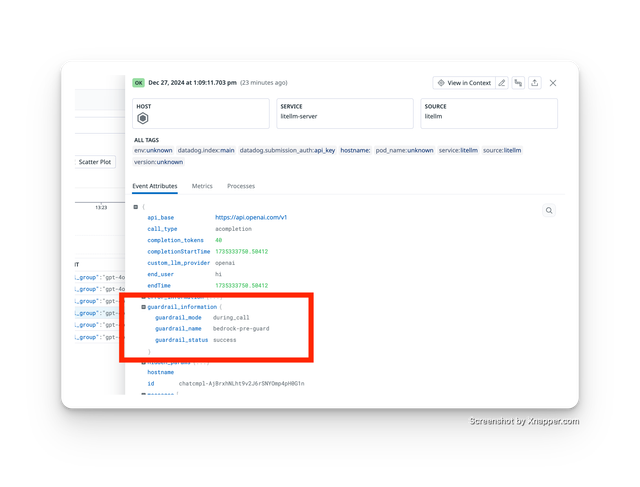
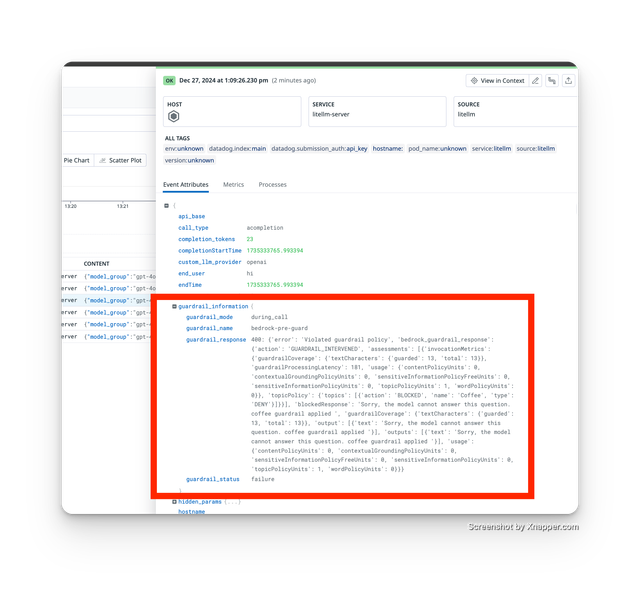
监控哪些 guardrails 被执行以及它们是成功还是失败。例如,guardrail 出现异常并导致本不应失败的请求失败
✨ 这是企业版专属功能 获取免费试用
设置
- 将 LiteLLM 连接到受支持的日志提供商
- 使用
guardrails参数发出请求 - 检查您的日志提供商以查看 guardrail 跟踪
跟踪的 Guardrail 成功
跟踪的 Guardrail 失败
✨ 按 API 密钥控制 Guardrails
✨ 这是企业版专属功能 获取免费试用
使用此功能控制每个 API 密钥运行哪些 guardrails。在本教程中,我们只想让以下 guardrails 为一个 API 密钥运行
guardrails: ["aporia-pre-guard", "aporia-post-guard"]
步骤 1 使用 guardrail 设置创建密钥
- /key/generate
- /key/update
curl -X POST 'http://0.0.0.0:4000/key/generate' \
    -H 'Authorization: Bearer sk-1234' \
    -H 'Content-Type: application/json' \
    -D '{
            "guardrails": ["aporia-pre-guard", "aporia-post-guard"]
        }
    }'
curl --location 'http://0.0.0.0:4000/key/update' \
    --header 'Authorization: Bearer sk-1234' \
    --header 'Content-Type: application/json' \
    --data '{
        "key": "sk-jNm1Zar7XfNdZXp49Z1kSQ",
        "guardrails": ["aporia-pre-guard", "aporia-post-guard"]
        }
}'
步骤 2 使用新密钥进行测试
curl --location 'http://0.0.0.0:4000/chat/completions' \
    --header 'Authorization: Bearer sk-jNm1Zar7XfNdZXp49Z1kSQ' \
    --header 'Content-Type: application/json' \
    --data '{
    "model": "gpt-3.5-turbo",
    "messages": [
        {
        "role": "user",
        "content": "my email is ishaan@berri.ai"
        }
    ]
}'
✨ 禁止团队开启/关闭 guardrails
✨ 这是企业版专属功能 获取免费试用
1. 禁止团队修改 guardrails
curl -X POST 'http://0.0.0.0:4000/team/update' \
-H 'Authorization: Bearer sk-1234' \
-H 'Content-Type: application/json' \
-D '{
    "team_id": "4198d93c-d375-4c83-8d5a-71e7c5473e50",
    "metadata": {"guardrails": {"modify_guardrails": false}}
}'
2. 尝试禁用某个调用的 guardrails
curl --location 'http://0.0.0.0:4000/chat/completions' \
--header 'Content-Type: application/json' \
--header 'Authorization: Bearer $LITELLM_VIRTUAL_KEY' \
--data '{
"model": "gpt-3.5-turbo",
    "messages": [
      {
        "role": "user",
        "content": "Think of 10 random colors."
      }
    ],
    "metadata": {"guardrails": {"hide_secrets": false}}
}'
3. 获取 403 错误
{
    "error": {
        "message": {
            "error": "Your team does not have permission to modify guardrails."
        },
        "type": "auth_error",
        "param": "None",
        "code": 403
    }
}
预计在您的回调服务器日志中不会看到 +1 412-612-9992。
此请求上运行了 pii_masking guardrail,因为 api key=sk-jNm1Zar7XfNdZXp49Z1kSQ 具有 "permissions": {"pii_masking": true}
规范
YAML 中的 guardrails 配置
guardrails:
  - guardrail_name: string     # Required: Name of the guardrail
    litellm_params:            # Required: Configuration parameters
      guardrail: string        # Required: One of "aporia", "bedrock", "guardrails_ai", "lakera", "presidio", "hide-secrets"
      mode: Union[string, List[string]]             # Required: One or more of "pre_call", "post_call", "during_call", "logging_only"
      api_key: string          # Required: API key for the guardrail service
      api_base: string         # Optional: Base URL for the guardrail service
      default_on: boolean      # Optional: Default False. When set to True, will run on every request, does not need client to specify guardrail in request
    guardrail_info:            # Optional[Dict]: Additional information about the guardrail
guardrails 请求参数
guardrails 参数可以传递给任何 LiteLLM Proxy 端点(/chat/completions, /completions, /embeddings)。
格式选项
- 简单列表格式
"guardrails": [
    "aporia-pre-guard",
    "aporia-post-guard"
]
- 高级字典格式
在此格式中,字典键是您要运行的 guardrail_name
"guardrails": {
    "aporia-pre-guard": {
        "extra_body": {
            "success_threshold": 0.9,
            "other_param": "value"
        }
    }
}
类型定义
guardrails: Union[
    List[str],                              # Simple list of guardrail names
    Dict[str, DynamicGuardrailParams]       # Advanced configuration
]

class DynamicGuardrailParams:
    extra_body: Dict[str, Any]              # Additional parameters for the guardrail