💰 设置团队预算
跟踪开销,为内部团队设置预算
设置每月团队预算
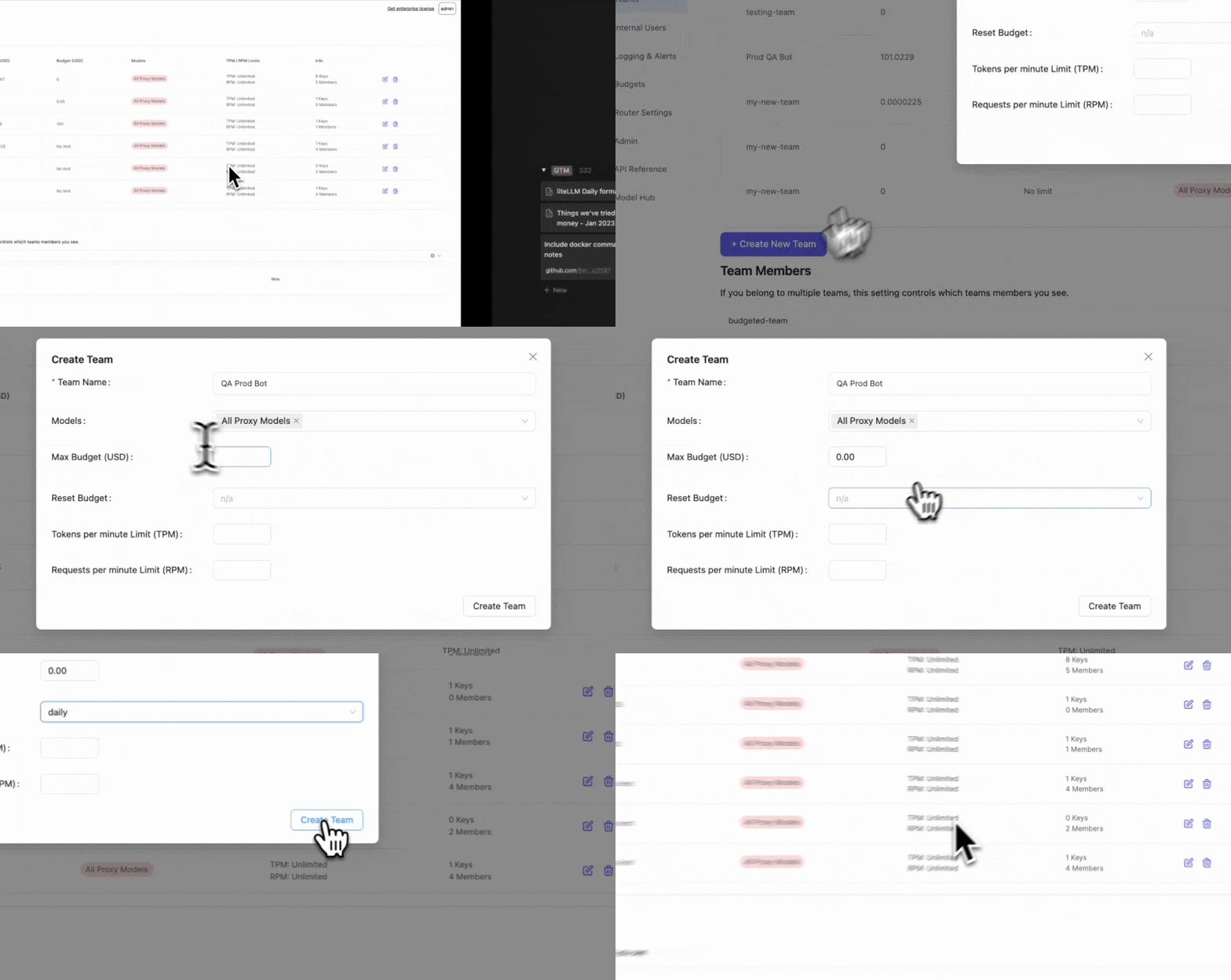
1. 创建团队
- 设置
max_budget=000000001(团队被允许花费的美元金额) - 设置
budget_duration="1d"(预算应多久更新一次)
- API
- 管理界面
创建新团队并设置 max_budget 和 budget_duration
curl -X POST 'http://0.0.0.0:4000/team/new' \
     -H 'Authorization: Bearer sk-1234' \
     -H 'Content-Type: application/json' \
     -d '{
            "team_alias": "QA Prod Bot",
            "max_budget": 0.000000001,
            "budget_duration": "1d"
        }'
响应
{
 "team_alias": "QA Prod Bot",
 "team_id": "de35b29e-6ca8-4f47-b804-2b79d07aa99a",
 "max_budget": 0.0001,
 "budget_duration": "1d",
 "budget_reset_at": "2024-06-14T22:48:36.594000Z"
}
budget_duration 的可能值
budget_duration | 预算何时重置 |
|---|---|
budget_duration="1s" | 每 1 秒 |
budget_duration="1m" | 每 1 分钟 |
budget_duration="1h" | 每 1 小时 |
budget_duration="1d" | 每 1 天 |
budget_duration="30d" | 每 1 个月 |
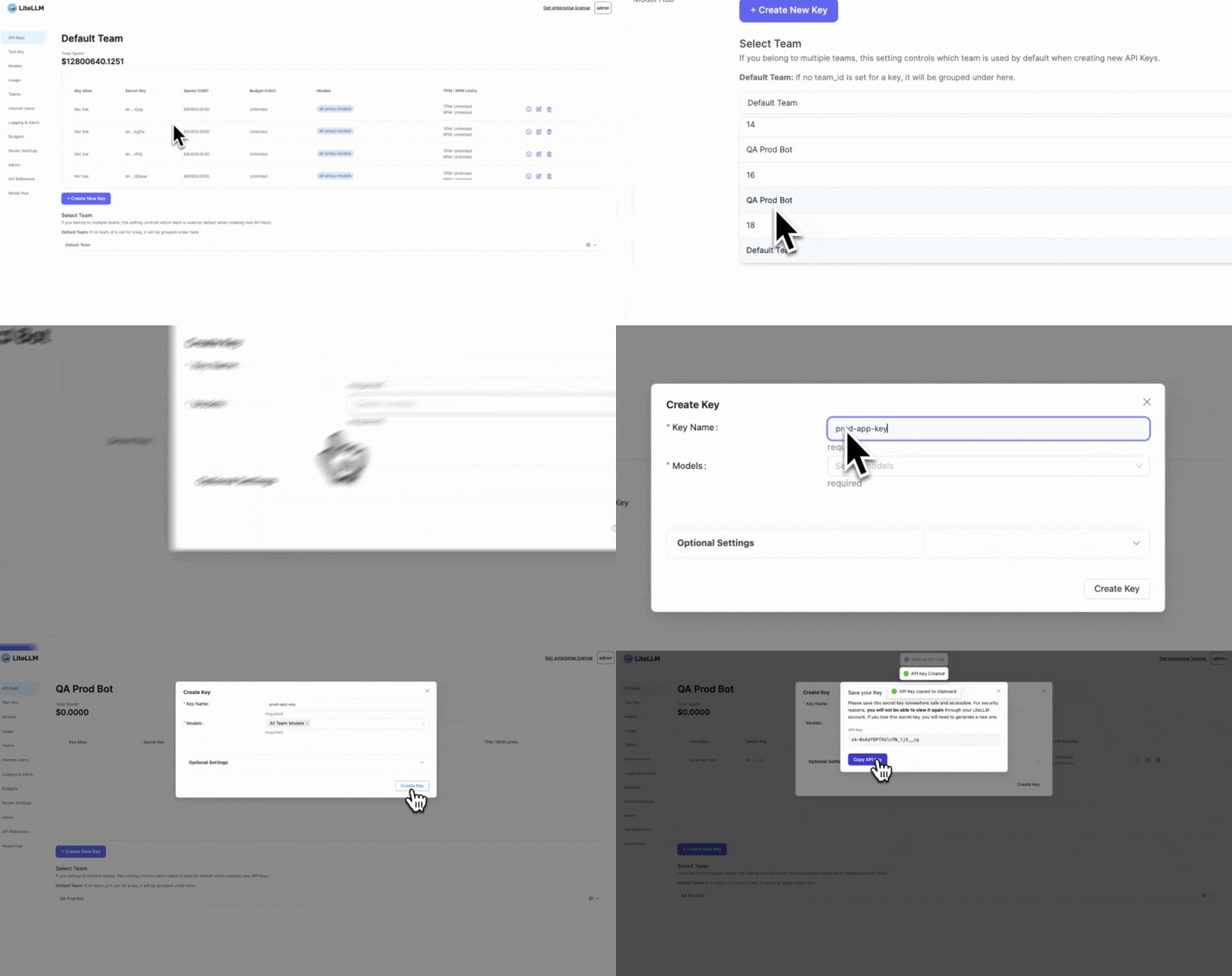
2. 为 team 创建密钥
为 Team=QA Prod Bot 和 Step 1 中的 team_id="de35b29e-6ca8-4f47-b804-2b79d07aa99a" 创建密钥
- API
- 管理界面
💡 为 Team="QA Prod Bot" 设置的预算将应用于此团队
curl -X POST 'http://0.0.0.0:4000/key/generate' \
     -H 'Authorization: Bearer sk-1234' \
     -H 'Content-Type: application/json' \
     -d '{"team_id": "de35b29e-6ca8-4f47-b804-2b79d07aa99a"}'
响应
{"team_id":"de35b29e-6ca8-4f47-b804-2b79d07aa99a", "key":"sk-5qtncoYjzRcxMM4bDRktNQ"}
3. 测试
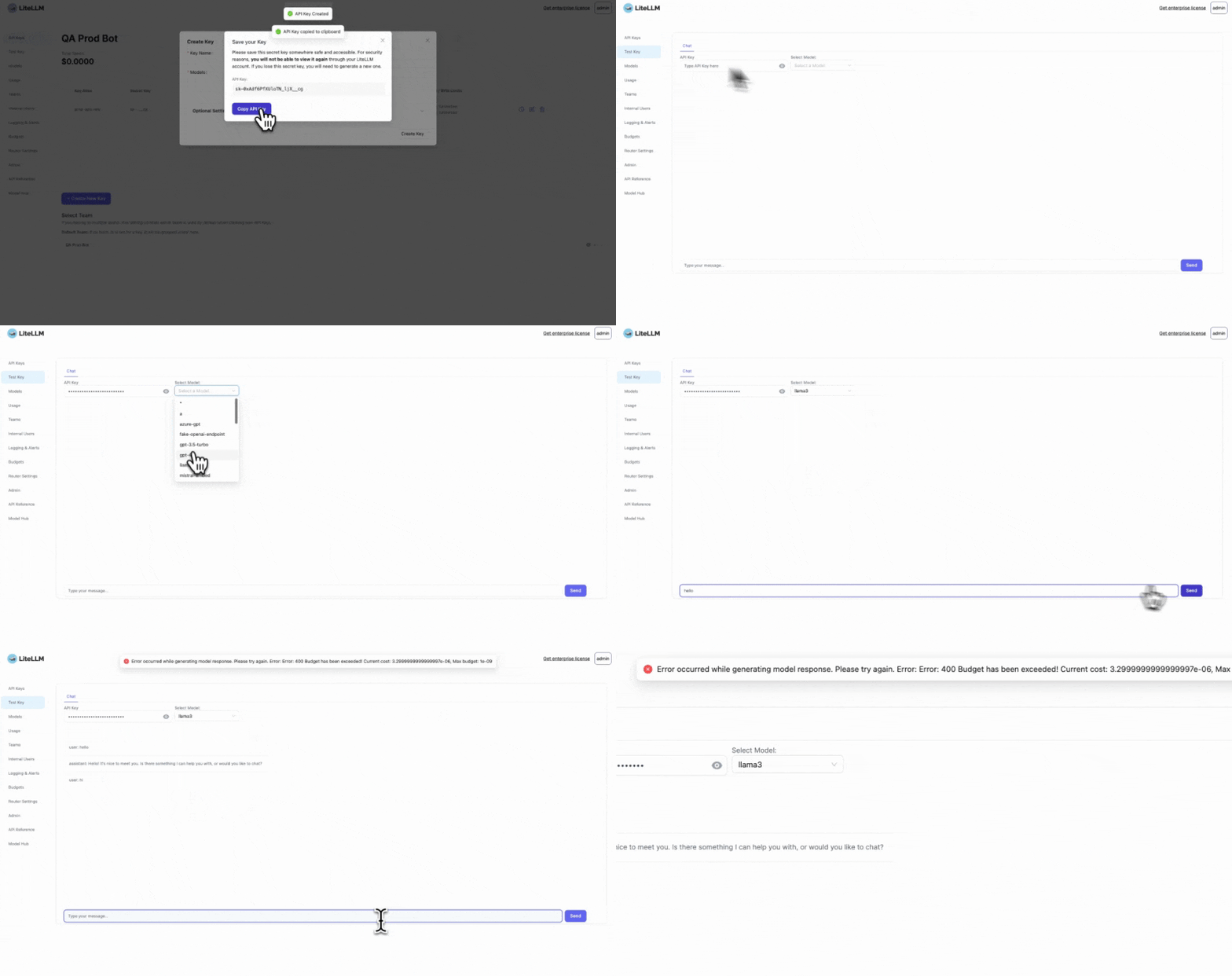
使用步骤 2 中的密钥并运行此请求两次
- API
- 管理界面
curl -X POST 'http://0.0.0.0:4000/chat/completions' \
     -H 'Authorization: Bearer sk-mso-JSykEGri86KyOvgxBw' \
     -H 'Content-Type: application/json' \
     -d ' {
           "model": "llama3",
           "messages": [
             {
               "role": "user",
               "content": "hi"
             }
           ]
         }'
在第二次响应时 - 预期会看到以下异常
{
 "error": {
   "message": "Budget has been exceeded! Current cost: 3.5e-06, Max budget: 1e-09",
   "type": "auth_error",
   "param": null,
   "code": 400
 }
}
高级
remaining_budget 的 Prometheus 指标
你需要在代理的 config.yaml 中包含以下内容
litellm_settings:
  success_callback: ["prometheus"]
  failure_callback: ["prometheus"]
预期在 prometheus 上看到此指标以跟踪团队的剩余预算
litellm_remaining_team_budget_metric{team_alias="QA Prod Bot",team_id="de35b29e-6ca8-4f47-b804-2b79d07aa99a"} 9.699999999999992e-06
动态 TPM/RPM 分配
防止项目占用过多的 tpm/rpm。
根据该分钟内的活跃密钥动态分配 TPM/RPM 配额给 API 密钥。 查看代码
- 设置 config.yaml
model_list:
  - model_name: my-fake-model
    litellm_params:
      model: gpt-3.5-turbo
      api_key: my-fake-key
      mock_response: hello-world
      tpm: 60

litellm_settings:
  callbacks: ["dynamic_rate_limiter"]

general_settings:
  master_key: sk-1234 # OR set `LITELLM_MASTER_KEY=".."` in your .env
  database_url: postgres://.. # OR set `DATABASE_URL=".."` in your .env
- 启动代理
litellm --config /path/to/config.yaml
- 测试!
"""
- Run 2 concurrent teams calling same model
- model has 60 TPM
- Mock response returns 30 total tokens / request
- Each team will only be able to make 1 request per minute
"""

import requests
from openai import OpenAI, RateLimitError

def create_key(api_key: str, base_url: str):
    response = requests.post(
        url="{}/key/generate".format(base_url),
        json={},
        headers={
            "Authorization": "Bearer {}".format(api_key)
        }
    )

    _response = response.json()

    return _response["key"]

key_1 = create_key(api_key="sk-1234", base_url="http://0.0.0.0:4000")
key_2 = create_key(api_key="sk-1234", base_url="http://0.0.0.0:4000")

# call proxy with key 1 - works
openai_client_1 = OpenAI(api_key=key_1, base_url="http://0.0.0.0:4000")

response = openai_client_1.chat.completions.with_raw_response.create(
    model="my-fake-model", messages=[{"role": "user", "content": "Hello world!"}],
)

print("Headers for call 1 - {}".format(response.headers))
_response = response.parse()
print("Total tokens for call - {}".format(_response.usage.total_tokens))


# call proxy with key 2 -  works
openai_client_2 = OpenAI(api_key=key_2, base_url="http://0.0.0.0:4000")

response = openai_client_2.chat.completions.with_raw_response.create(
    model="my-fake-model", messages=[{"role": "user", "content": "Hello world!"}],
)

print("Headers for call 2 - {}".format(response.headers))
_response = response.parse()
print("Total tokens for call - {}".format(_response.usage.total_tokens))
# call proxy with key 2 -  fails
try:
    openai_client_2.chat.completions.with_raw_response.create(model="my-fake-model", messages=[{"role": "user", "content": "Hey, how's it going?"}])
    raise Exception("This should have failed!")
except RateLimitError as e:
    print("This was rate limited b/c - {}".format(str(e)))
预期响应
This was rate limited b/c - Error code: 429 - {'error': {'message': {'error': 'Key=<hashed_token> over available TPM=0. Model TPM=0, Active keys=2'}, 'type': 'None', 'param': 'None', 'code': 429}}
✨[BETA]设置优先级 / 保留配额
为生产环境中的项目保留 tpm/rpm 容量。
提示
根据优先级保留密钥的 tpm/rpm 是高级功能。请获取企业版许可证以使用此功能。
- 设置 config.yaml
model_list:
  - model_name: gpt-3.5-turbo
    litellm_params:
      model: "gpt-3.5-turbo"
      api_key: os.environ/OPENAI_API_KEY
      rpm: 100

litellm_settings:
  callbacks: ["dynamic_rate_limiter"]
  priority_reservation: {"dev": 0, "prod": 1}

general_settings:
  master_key: sk-1234 # OR set `LITELLM_MASTER_KEY=".."` in your .env
  database_url: postgres://.. # OR set `DATABASE_URL=".."` in your .env
priority_reservation
- 字典[str, float]
- str: 可以是任何字符串
- float: 从 0 到 1。指定为此优先级密钥保留的 tpm/rpm 百分比。
启动代理
litellm --config /path/to/config.yaml
- 创建具有该优先级的密钥
curl -X POST 'http://0.0.0.0:4000/key/generate' \
-H 'Authorization: Bearer <your-master-key>' \
-H 'Content-Type: application/json' \
-D '{
    "metadata": {"priority": "dev"} # 👈 KEY CHANGE
}'
预期响应
{
  ...
  "key": "sk-.."
}
- 测试!
curl -X POST 'http://0.0.0.0:4000/chat/completions' \
  -H 'Content-Type: application/json' \
  -H 'Authorization: sk-...' \ # 👈 key from step 2.
  -D '{
  "model": "gpt-3.5-turbo",
  "messages": [
      {
      "role": "user",
      "content": "what llm are you"
      }
  ],
}'
预期响应
Key=... over available RPM=0. Model RPM=100, Active keys=None